How Afters works
How a shared disposable camera works: from first shot to reveal
By the Afters team · Updated · 5 min read
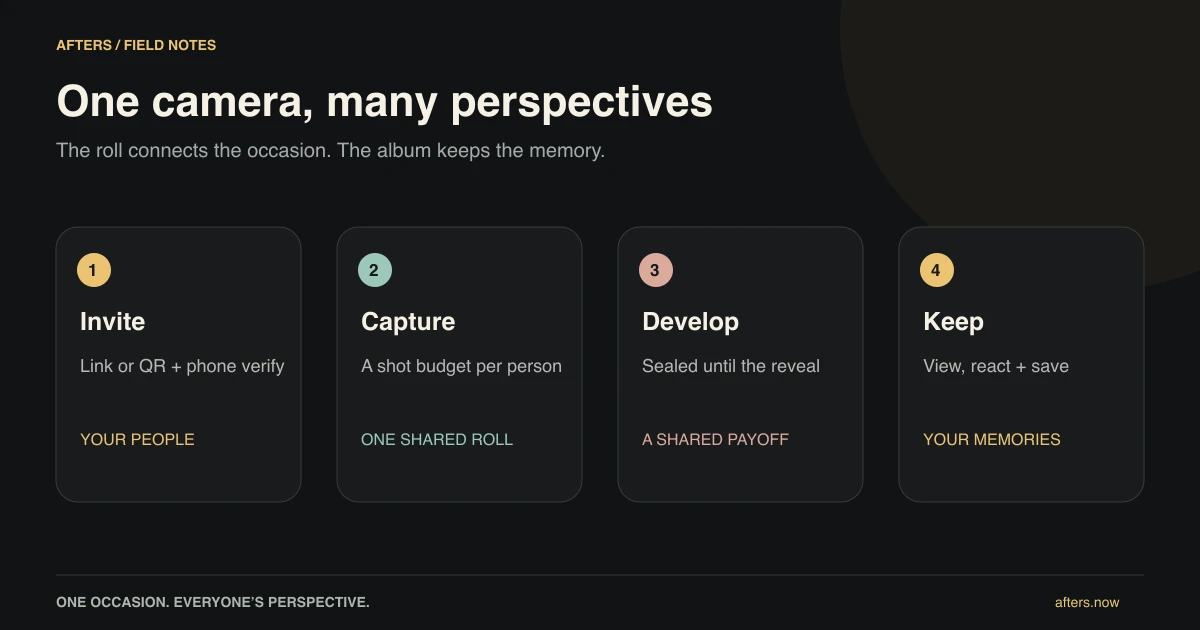
Some of the pictures you would most like to have are being taken by somebody else. A friend can see you laughing across the table. A cousin notices your parents dancing. Someone catches the moment after the group portrait, when everybody stops trying to look ready.
Afters gives those different views one home. It is a shared disposable-style camera for an occasion: everyone takes a few shots from their own phone, the roll stays sealed for the crew, and the photographs appear together when it develops. You get to enjoy the event first and discover its other little stories afterward.
The short version
- One occasion, one shared roll, with room for everybody's viewpoint.
- Join by link or QR and verify your number; photos work in the browser.
- The party can end without the pictures disappearing.
Make a place for this particular memory
Give the roll a name that will mean something when you see it later. Your friend's birthday. Saturday at the festival. The dinner before somebody moves away. An ordinary evening is enough; the camera does not need a grand occasion to justify remembering it.
As host, you choose each person's shot allowance, when shooting closes, and when the roll develops. Current setup is for short occasions within roughly three days, so create the actual roll near the gathering. New rolls develop automatically, normally the next morning. Closing ends capture; development opens the album. Those are different moments, and guests should know which one they are waiting for.
Invite the people who will make it yours
Share the roll's link ahead of time or put its QR where guests can pause comfortably. Explain the idea before the instructions: we are making one shared memory tonight. People can understand why they are joining before being asked to do anything on their phone.
Guests verify their number and join the roll. They can take photos in a browser without downloading an app; the native apps also offer video and additional camera capabilities. Joining and login need a connection, and new members normally cannot join after close. A little preparation before arrival keeps the practical part from interrupting the hello.
Take a picture, then return to the person beside you
Each participant has their own shot allowance, not a share of one tiny budget for the whole party. You can photograph what catches your attention without wondering whether somebody else has already used the roll. The aim is different viewpoints, not a contest to document the most.
Notice a person you are glad to see, a detail the host chose, or something happening on the other side of the room. Ask before a portrait, find a little light, and let the moment carry on. The shot-limit guide explains the practical choices. The film treatment gives the pictures a common feel without asking everyone to make polished photographs.
Let there be something you have not seen yet
While the roll is sealed, the crew waits rather than browsing every new picture. That leaves a little surprise for later. A teaser is part of the waiting experience, not the finished photo. You can put the phone away without feeling you should check what everyone else just posted.
The host can preview and moderate before reveal, so sealed does not mean nobody has access. Pending native uploads also need care: they must finish within the allowed window and before development. If a connection has been unreliable, check the upload guide rather than assuming a local preview means a photo has reached the roll.
Open the evening again, without having to recreate it
When the roll develops, members can look through the shared album, like a picture, explain the story in a comment, and save favorites. Someone may finally understand why another table was laughing. You may find a photograph of yourself that feels more like you than the one you would have taken.
You do not need a permanent friend list to keep that memory. Current rolls do not automatically expire when the occasion ends. Be thoughtful about sharing further: a deliberately shared developed-photo link can be viewed and forwarded outside the roll. Our sharing guide explains the boundaries, so the little surprise stays a welcome one.
Questions people ask
Is Afters a shared album or a camera?
Both, at different moments. Guests first capture into a shared camera roll with a per-person cap. After development, it becomes an album for viewing, likes, comments and individual saves.
Does Afters require an app or an account?
An app download is optional for browser photos. Guests still verify their phone number and join the roll. Native apps add video and other camera capabilities.
What is the difference between closing and developing a roll?
Closing ends new capture; development opens the pictures to the crew. Eligible pending native uploads have limited retry rules and must finish before development, so check them before an early reveal.
Keep reading
Why give everyone a limited number of shots?
Notice a little more, take a few frames, and leave the rest of the evening for living.
Private event photo sharing: who can see what in Afters?
Feel comfortable in the picture by understanding who can see it and where it can travel.
Your life in shared rolls: a personal photo history made together
Some people stay. Some evenings do not repeat. Both can have a place in your memories.