How Afters works
Taking event photos with unreliable internet: what to prepare
By the Afters team · Updated · 5 min read
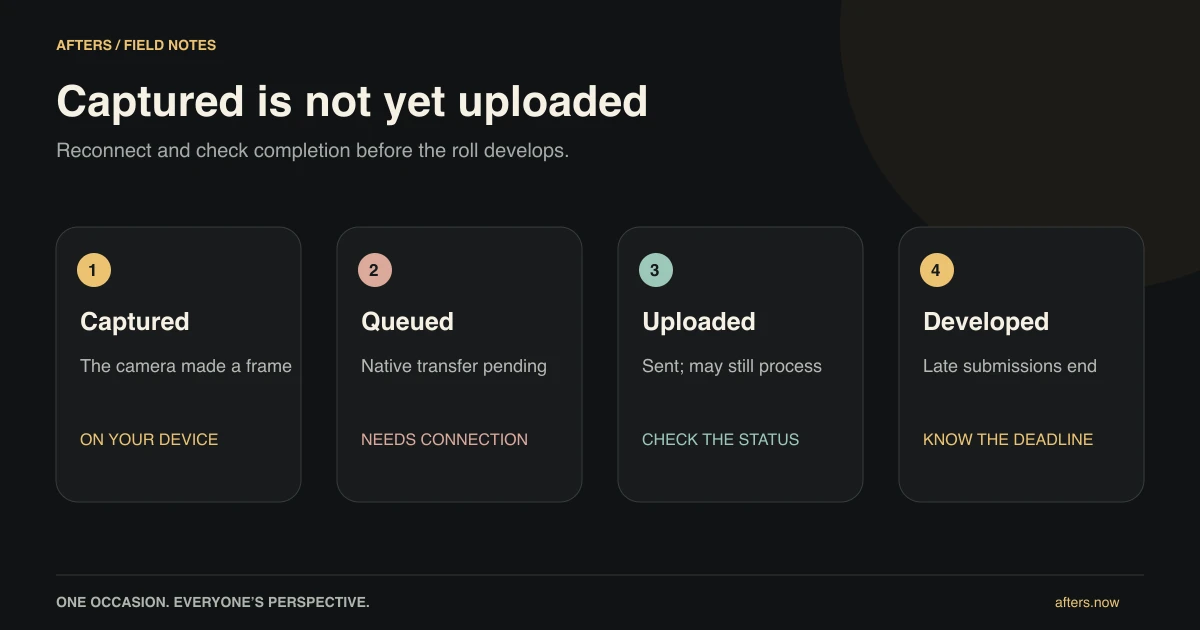
A lovely moment is a particularly frustrating time to discover that your phone has lost its connection. You have taken the picture. You can almost feel the relief of having caught it. Then the upload sits waiting, and you are no longer sure whether the memory is safely in the shared roll.
At a festival, a rural wedding or a crowded party, that uncertainty can happen. The useful response is not to spend the evening watching a spinner. It is to know what needs a connection, what the native app can retry, and when to check before everyone opens the album.
The short version
- Join and verify your number before the connection becomes difficult.
- A local picture or pending upload is not yet a completed shared photo.
- Reconnect and check uploads before development, especially before an early reveal.
A picture on your phone has not necessarily reached the group
Think of taking a picture and delivering it as separate steps. The camera may have made the frame while the transfer still needs to finish. In the native app, an eligible capture can sit in a retry queue. That is useful, but it is not the same as the photograph being safely available in the shared album.
There is also a different kind of waiting: a sealed roll deliberately keeps full pictures from the crew until development. A teaser does not necessarily mean the upload failed. Check for an actual pending or failed status rather than judging only by whether you can open the final photo yet. Uploaded media may need processing too.
Choose your camera before you reach the weak-signal corner
The browser is convenient for guests who do not want another app. It still needs a connection for phone verification, joining and sending photos. Joining before arrival helps, but does not turn the browser into a fully offline camera system.
The native Afters apps have a persistent queue that can retry eligible captures affected by a network failure. Try the actual app on your phone before depending on that behavior. When you find a reliable connection, open it and check completion. Do not assume that leaving the phone in a bag means every pending item will finish on its own in the background.
Tell the host if your pictures are still finding their way in
A host may be excited to reveal the roll early. If you still have pending shots, say so before they do. Development opens the photographs to the crew and ends the late-upload opportunity, even for a picture captured before shooting closed.
Eligible native captures taken before close can have a limited retry window, currently at most 48 hours after close, but only while the roll remains undeveloped. Most reveals happen much sooner. The shot cap and other rules still apply. Treat the actual development time as the deadline to work toward, rather than counting on a theoretical extra couple of days.
Do the small checks while nobody is waiting for you
Open the real invitation while connected, verify your number, join the correct roll and try a capture. Allow camera access before you are standing with friends who are ready for a picture. If you plan to use native video or retry behavior, test those in the native app rather than assuming the browser works the same way.
Bring enough battery, find out where you can reconnect, and leave some time between the last intended pictures and development. Keep a separate plan for irreplaceable coverage. These preparations are not exciting, but they can protect the exciting part: being able to notice something lovely without spending the next hour wondering whether you have lost it.
Be gentle with a phone that still holds something important
If an upload is waiting, restore a stable connection, open the app and give eligible pending work a chance to finish. Avoid clearing app data or reinstalling as your first experiment; local captures may still matter. Check the status instead of repeatedly taking the same picture and hoping one version will arrive.
If the roll has already developed or a capture has been rejected, retrying may not solve it. Contact support with the roll code, device and a clear description, never a password or verification code. For a festival day, the crew story puts the preparation back where it belongs: around the edges of a day spent with your friends.
Questions people ask
Can I join an Afters roll without internet?
Phone verification and joining need a connection. Open the invitation and finish those steps ahead when you can, rather than relying on a first-time session working offline.
Will the native app upload my pictures after the party closes?
Eligible queued native captures taken before close may retry during the limited grace period, subject to the cap and other rules. They must arrive before development; afterward, late submissions are rejected.
Does the 48-hour grace mean I can wait two days?
No. It is only a maximum after close. Development ends the opportunity earlier, usually much sooner. Check your roll's actual reveal time and finish uploads before it.
Keep reading
Your festival crew, one shared camera roll
The set you missed, the friends you found, and the breakfast where it all comes back.
How a shared disposable camera works: from first shot to reveal
Take a few pictures, come back to the party, and open the memory together afterward.
Wake up to your wedding through your guests' eyes
The next morning, find the little pieces of your wedding you could not be there to see.